Many players sooner or later come to the thought: why not move my game comb somewhere where the grass is greener, the air is cleaner, the neighbors are richer, and there are more prospects?!
The administration of the game "Destiny Sphere" has long developed fast mechanisms for relocation both from world to world and migrations within the home ring. Any player can use these services for free.
How to do it?
Let's consider all the options with detailed examples and screenshots.
First of all, let's clarify that there are two types of free relocation:
- Relocation of a comb and colonies from one game world to another game world
- Relocation of a comb within your current game world along the home ring (colonies remain in place)
Each type of relocation has its own limitation - you can use them once within 60-90 days (depending on the specifics of each game world). Therefore, you cannot change your location frequently.
When you go to the game page http://destinysphere.ru/ and enter your Login and Password, you get to your account and the world selection page opens (see screenshot 1)
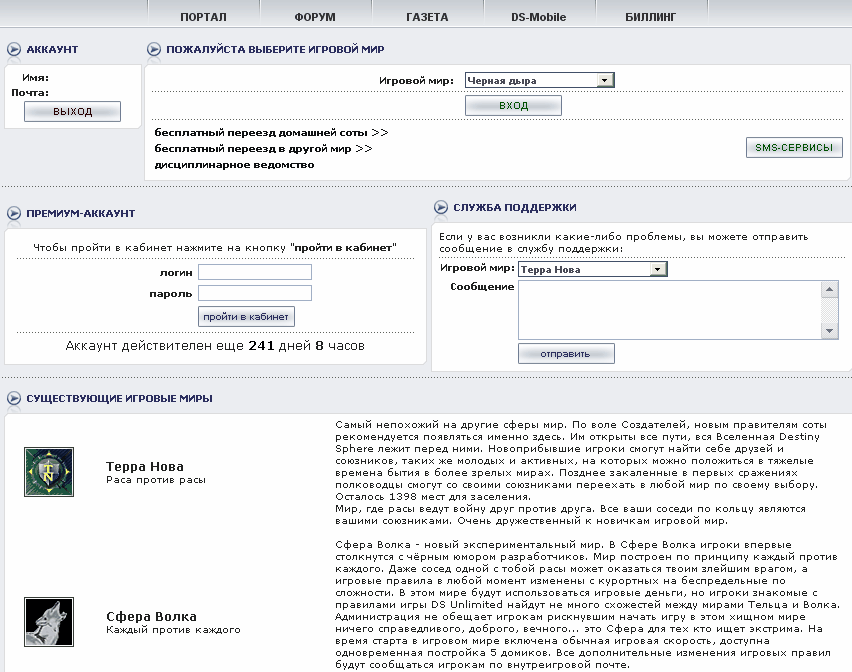
Almost at the very top of the page, under the "LOGIN" button, there are several links:
free relocation of home comb >> - here you can relocate along the home ring in your world
free relocation to another world >> - here you can relocate to another game world or send your comb for safekeeping in the "Black Hole"
disciplinary department >> - here you submit complaints about various outrages, register sitting and playing from one computer, report multi-accounts, but... this is not related to our conversation today and relocations, so we will not dwell on it in detail.
Let's first consider how to quickly relocate a home comb around the game ring, while continuing to play in your game world.
| |
IMPORTANT! Relocation along the home ring only changes the complex and comb number, but keeps you on the ring of your game race. You cannot change your game race or relocate, for example, from Vorania to the Psolao ring!
The same applies to relocations between worlds: you relocate to the ring of your race.
|
|
To relocate along the ring, click on the link
free relocation of home comb >> and the relocation menu opens.
Select the game world where your comb is located. Some of our players have activated the paid service of playing in multiple worlds, where there can be many combs, and therefore many worlds. It is important to specify the world in which you want to relocate along the home ring. Those who have one comb will have only one option in the world selection menu.
We have selected the world and clicked the "select" button.
The following window opens:
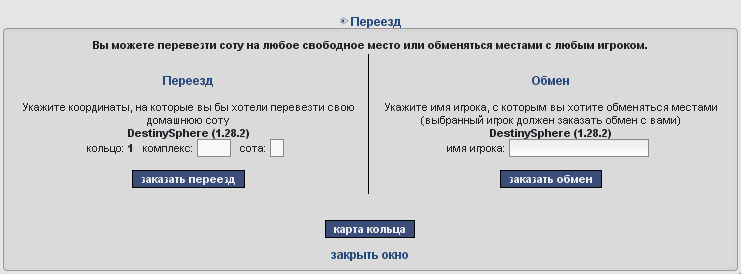
And in this menu, the developers try to confuse us, but we are not easily fooled!
Let's first consider the option of a simple relocation. For this, we are interested in the left part of the menu, where the word "Relocation" is in the heading.
This part will indicate the name of your home comb and the address where the comb is currently located.
Since you cannot change the home ring, it is already set in the parameters automatically. You only need to enter the new coordinates of the complex and comb where you want to move.
| |
IMPORTANT! If you do not specify the new complex and comb number, or specify an address where someone else's comb is already located, the relocation will not occur! You will be informed about this by an error message.
|
|
To find out where there are free spots on the ring, if you haven't done so before, you can click on the "ring map" button. A new window will open where you can view all occupied and free complexes and combs at the time of relocation.
It will look like this (nicknames, comb names, and coordinates will be different, depending on the actual player population of your world's rings):
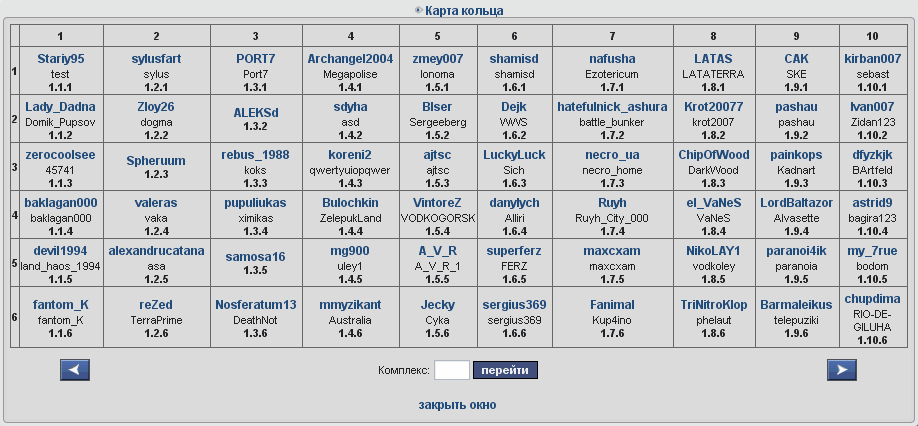
Having found what suits you as a future placement on the home ring, you close the ring map and enter the desired coordinates in the relocation window.
Click "order relocation".
If everything is done correctly, your comb will be automatically moved from the old location to the new one within a day. Usually, the relocation script runs late every evening when the load on the game servers slightly decreases.
| |
IMPORTANT! If you have done everything correctly, but you cannot move to a seemingly free spot in the complex, there is a high probability that this address has already been reserved by someone for a move. Try choosing a new location for the move.
You can also reserve a comb for a certain fee if you need the move not now, but in 2 weeks, and you are afraid that someone might take the address you need. This can be done through the paid services of the Billing department: https://billing.destinysphere.ru/
|
|
Now let's return to the option of exchanging comb locations.
This time, we pay attention to the right side of the relocation window, where it says "Exchange":
Many have probably already guessed that with the help of an exchange, you can relocate to a complex where all spots are occupied. And you urgently need to settle there!
You agree with someone from the players about the exchange beforehand. When an agreement is reached, you enter the player's game nickname in the cell and click "order exchange". After the second player confirms their consent to exchange places (they must also go through the entire comb relocation procedure described above), your comb will be automatically moved along the home ring to their place, and theirs to yours.
| |
IMPORTANT! If the other player does not confirm their consent to exchange home comb places with you, you will not be able to relocate and the exchange will not take place!
|
|
What to do if you want to change the game world?
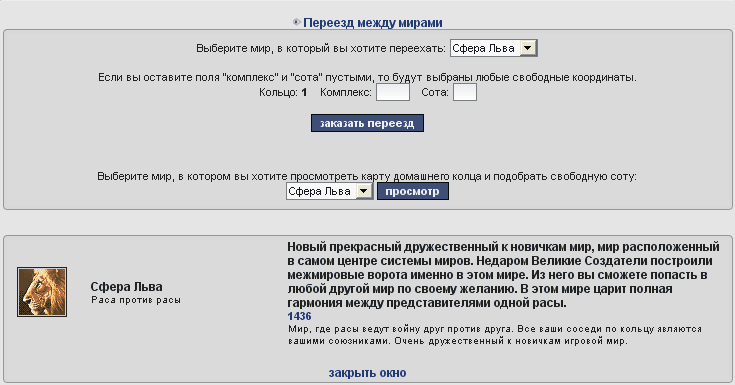
To do this, on the world selection page (see screenshot 1) you need to select free relocation to another world >> . This will open the following window:
Here you choose from which world you want to relocate.
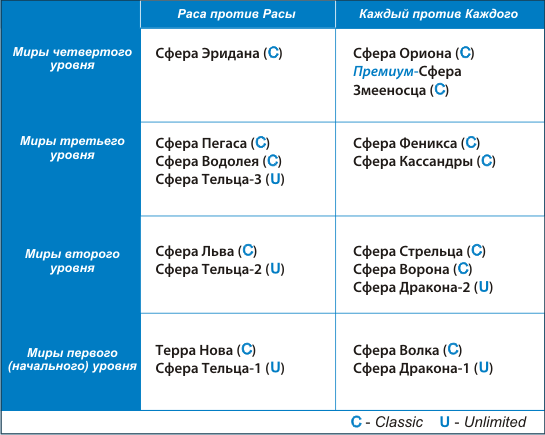
Usually, relocation occurs from younger worlds in development to older ones.
This restriction is made by the game administration primarily to maintain balance in the game world. It is hard to imagine what could happen, for example, to the Terra Nova world if several top players from Orion were to relocate to it, whose combined armies exceed the sum of all armies of Terra Nova players.
To prevent such a power imbalance, relocation restrictions are imposed.
| |
IMPORTANT! When relocating from a "Free For All" class world to a "Race vs. Race" class world, units not of your race will be destroyed! This does not apply to quest units.
|
|
It is worth noting that players from younger worlds have significantly more relocation opportunities to other worlds. They can even, at their own risk, go in search of luck on Orion, but then returning from there to a younger world will be impossible.
So, we have chosen the sphere from which we want to relocate.
You can relocate from a "Race vs. Race" class world to a "Free For All" world, and vice versa. It all depends on the development level of the world and its position in the world chain.
Depending on your game world, you will be offered options to relocate to another, more advanced world or several worlds to choose from (see screenshot below).
For example: the next in development after Terra Nova is Leo Sphere. Although you can choose any available game world, perhaps friends and future allies are already waiting for you there.
You choose the world, look at the world's ring map, and select the optimal location, enter all the numbers, click "Order relocation". After some time, you will find yourself in the place you were striving for!
| |
IMPORTANT! Each world has its own individual military unit upkeep parameter, the amount of resources they consume each turn to maintain units on the comb. Take appropriate measures in advance.
Carefully study the information about future worlds on the forum before relocating. Do not hesitate to ask local players about the features, pros and cons, and alliances of the future game world. You can also seek help from the Guardians of your current or future game world.
|
|
When describing relocations, one cannot fail to mention a unique opportunity: relocation from a game world to a special world "Black Hole".
Sometimes situations arise or times come when you cannot actively play at the moment, but you don't want to abandon your comb, because you want to return to the game a little later. For this, each player can use inter-world relocation to send their comb and colonies to the "Black Hole" world. This is a special world with special parameters, where game time is stopped, and the comb can stay here for up to a year. When the player decides to actively return to the game, they can "unfreeze" their comb and return it to their former game world, and everything on the comb will be in the state in which the player placed it in the "Black Hole".
| |
IMPORTANT! Account recovery from the 'Black Hole' world to active worlds is paid! For information about this service and its prices, see: https://billing.destinysphere.ru/
|
|
In addition to the above-mentioned
free relocations of the home comb along the ring and comb with colonies between worlds, there are
a number of paid services:
- Relocation of a comb along the ring to a free spot (main rings only)
- Relocation of a comb along the ring to a free spot in combination with the inter-world relocation service
- Relocation of a comb along the ring to a free spot (Melsion only)
- Exchange of places between combs of two players (main rings only)
- Exchange of places between combs of two players (Melsion)
All these services have no time limits and can be ordered as often as you like. They can be ordered in the Billing section at: https://billing.destinysphere.ru/ . Players can also use their Cabinet to pay for services, provided they have enough in-game currency.
We add that paid inter-world relocations are carried out only according to the scheme of allowed relocations. You cannot relocate from an old world to a younger one, even with a paid relocation, but only to those worlds where it is allowed for the given Sphere.
For the Terra Nova world, there is a very important feature. This world is of the "Reception" class, meaning almost all players start the game by registering in this world. However, after some time, after a little comb development, each player of this world will be offered to relocate to another world. Do not be alarmed by this. It was designed this way.
| |
IMPORTANT! Relocation from Terra Nova to other worlds is mandatory for all players. If a player within a week from the moment the relocation offer is received does not independently choose the game world to which they want to relocate, it will be done automatically based on the programmed relocation quota.
|
|



 Relocations