Currently, Espionage is enabled in Lupus Sphere, Eridanus Sphere, Sagittarius Sphere, and Ophiuchus Sphere of the classic version of "Destiny Sphere", as well as in Libra Sphere in Destiny Sphere Unlimited.
Players will be further informed about the future introduction of Espionage in other game worlds!
So, you have built your comb as you see fit, chosen a certain direction, and opened the Central Gate. Now, in the science research menu, a new direction opens up for you. These are the research of Prodium and Espionage. See the documentation on resource extraction for Prodium; we will focus on espionage.
Espionage is one of the important game functions that allows you to obtain information about the enemy and protect your comb from scout guests. This prevents others from knowing what army is defending and sending waves to destroy it. Espionage uses two buildings: Espionage Center and Reconnaissance Control.
ATTENTION! Both buildings are unique and are built in the central part of the comb. They can only be demolished in one way: by ordering demolition in the Billing -> Unique Buildings! service
ESPIONAGE CENTER
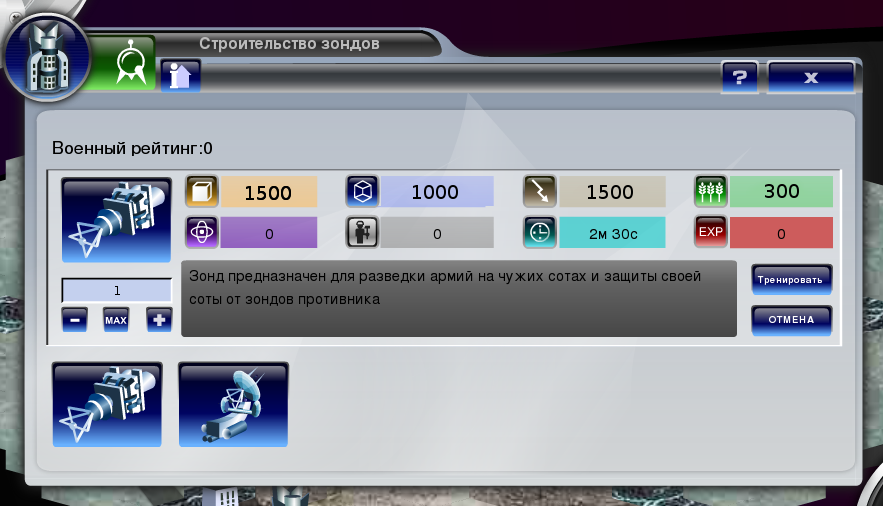
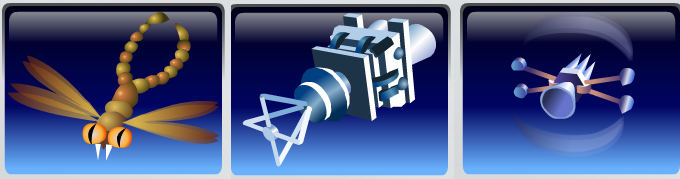
Espionage Center, unlike the previous building, is active. Probes are produced here. There are two types:Scout Probe and Explorer Probe.
A new unitScout will be added in the future.
In this building, you can order the construction of the aforementioned probes. The cost of each subsequent probe, unlike ordinary ones, increases by 1%.
Their initial cost is
Depending on the level of Espionage science, their maximum allowable quantity is determined. With each increase in Espionage level, you can build 20 more probes.
But the second type, Explorer probes. They can only be built when a higher level of Espionage is reached and cannot defend the comb.
Probes cannot be sent to defend your colony or an ally's comb. They only guard the one on which the Espionage buildings are built. Also, probes cannot be bought or sold.
SCOUT PROBE
It reconnoiters the strength of the enemy's army both in prodium equivalent and in individual units. In the received log, you can find out the number of units on the comb at the time of your spy's arrival. Please note that units in hiding or in flight at this time are not displayed in the log. Therefore, you need to be extremely careful when deciding to attack a comb and pay attention to the rating of the one you need to reconnoiter. It is better to be safe and send a spy about 5 minutes before your army's expected arrival to make sure that an armada is not waiting for you there that will wipe your entire army off the face of the earth.
Unlike the spam reconnaissance familiar to many players, the beauty of Espionage lies in the fact that the opponent does not see the spy flying towards him. A spy can only be detected if the opponent is defending their territory and has deployed a group of probes to defend their comb.
In the Spy Messages button, located to the right of the mail or the so-called green button (greeny, green), the opponent can only see the remaining time that their probes will spend on defense or reconnaissance.
15.09 12:26 - A group of 1 probes will return from defending comb Patto (2.12.6) 15.09 13:22
This message reminds you of the remaining time your Probes will spend on defense. 15.09 12:26 - 15.09 13:22.
But again, if the owner is attentive and sent a company that will properly meet the enemy partisans.
15.09 13:04 - A group of 1 probes has arrived to reconnoiter comb Patto (2.12.6) of player Va11kirja_y from comb Undr (4.279.1)
This means that the group of scouts you sent has arrived at the target comb. The date and time of arrival are indicated 15.09 13:04 the coordinates of the reconnoitered comb for reconnoitering comb Patto (2.12.6) and the coordinates of the comb from which your partisan squad was sent Undr (4.279.1).
15.09 13:04 - A group of 1 probes returns from reconnoitering comb Patto (2.12.6) of player Va11kirja_y to comb Undr (4.279.1). Arrival time: 15.09 13:36
Notifies the owner of the completed reconnaissance and return.
15.09 14:36 - 2.12.6 probes are undergoing repair on comb 1. Repair completion time 15.09 16:31
This message should alert the defense, as an attempt to reconnoiter was made. 1 probes are undergoing repair - during combat, one Probe was disabled, which will continue to function successfully after repair work is completed.
Scout Probe provides information about the army composition
Reconnaissance of comb Kaedven_E (1.1.6) from comb Patto (2.12.6) by a group of 2 probes. As a result of the battle, you lost 0 out of 2 probes. Your opponent lost 0 out of 0 probes. The data obtained is accurate. __________________________ The following troops were detected on the comb: no troops detected
or
The following troops were detected on the comb: Spider - 1 (weight 1 800) Santa Claus - 2 (weight 0) Snow Maiden - 2 (weight 0) Leviathan - 236 (weight 418 900) Monster - 1 (weight 4 113) Cyborg - 1 (weight 2 877)
Total weight of detected troops in prodium: 427 69
EXPLORER PROBE
This type of probe is very fragile but powerful. One Explorer deals the same damage as 8 Scouts. This type of probe receives the following information:
1. Amount of resources present.
2. Information about the comb's productivity.
3. Bonuses for the production of a particular resource.
4. Armies defending and attacking the reconnoitered comb.
The log itself looks like this:
Reconnaissance of comb Mecusun_W607 (1.1.3) from comb Patto (2.12.6) by a group of 1 probes. As a result of the battle, you lost 0 out of 1 probes. Your opponent lost 0 out of 0 probes. The data obtained is accurate. Resources on the comb: kaderieum: 73 142 223 nano-crystals: 255 396 energy: 528 542 food: 7 263 492 prodium: 2 500
resource production on the comb without bonuses: (If the science level is below 20, production is viewed without bonuses; if higher, with bonuses.) kaderieum: 3 725 nano-crystals: 25 energy: 8 600 food: 1 150 prodium: 0
To obtain information about players defending and attacking the reconnoitered comb, you need 30 level of Espionage science.
After studying 20 level, you will be able to see:
Information about comb defense:
1. Whether there are any foreign armies defending this comb
2. If so, their quantity
3. A list with army names, their owner's nickname, and the comb from which they were sent.
Information about armies attacking the comb. (similar to defense)
This probe has no analogue, unlike the Scout probes, before Espionage was introduced. It is very convenient for beginners and not only. No more guessing how many bags to send. Now, having received accurate information about the comb to which you plan to regularly send an army for looting, you can calculate the number needed to clear the enemy territory of leftover goodies. Importantly, you can reduce the risk of an unexpected encounter with a randomly sent army of some neighbor of the reconnoitered player.
This information will also be useful for military operations.
With active players, this trick won't work, of course. You will get the information, but the question is "Will you be able to carry it out?" In any case, upon receiving accurate data, you possess valuable information. At your discretion, you or your allies can use it.
OBTAINING INFORMATION
Each received log displays the accuracy of the reconnaissance information. There are three types:
1. accurate
2. medium accuracy
3. inaccurate
RECONNAISSANCE CONTROL
This building, in terms of its functions, resembles a Military Base. Logs are stored here, and it is here that probes are sent for reconnaissance and defense.
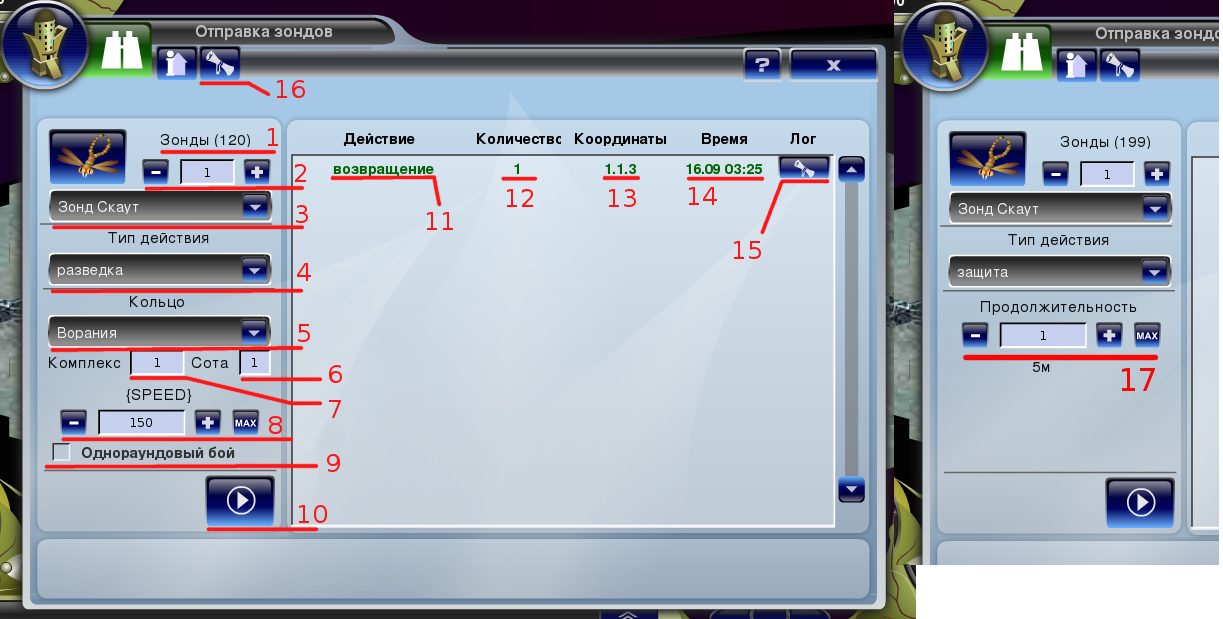
Upon entering the main page, the following picture appears before you:
1. Number of built probes stationed on the comb. 2. Number of probes in the group. 3. Probe type. 4. Desired action. 5. Ring selection. 6. Reconnoitered comb number. 7. Reconnoitered complex number 8. Group flight speed 9. Single-round combat (the group, regardless of the number of probes in the attack, conducts one round of combat, thereby reducing your losses, but also reducing the percentage of obtaining a log with accurate data) 10. Send group. 11. Actions of groups outside the comb 12. Number of probes in the group 13. Coordinates of the reconnoitered comb (for reconnaissance) or guarded (for defense) 14. Arrival time at the destination or return from it 15. Log of a group outside the comb. 16. Reconnaissance logs. 17. Duration of the group's stay in defense.(5 - 9 when reconnoitering the enemy) (5 - 9 when reconnoitering the enemy)
SCOUTING LOGS
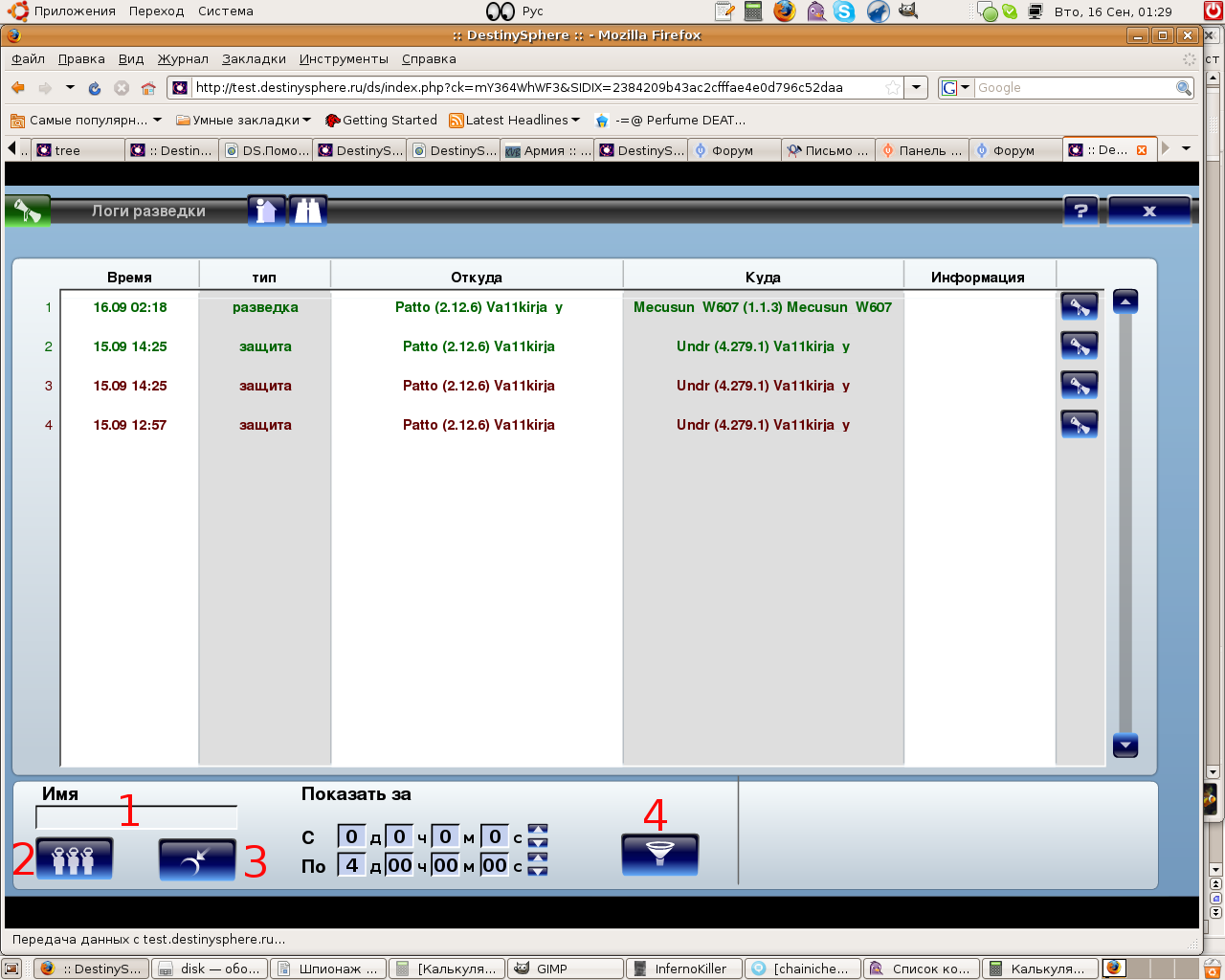
On the main page, in the Scout Management under item 16, there is a Scouting Logs button. All received logs are stored here. To view a log, simply click on the button with the scroll.
Sooner or later, there will be many logs and they will start to get mixed up. For some, a month is enough, for some - a week, and for some - an hour)))) It all depends on talent.
For convenience, at the bottom of the log menu, there is a filter.
It is possible to search logs by the opponent's nickname; you just need to enter it in the box marked with a one in the picture and click filter (4)
The action filter allows you to select logs separately for defense and separately for attack.(2)
Under number three, there is a sorting of logs by colonies.